Cloud communication
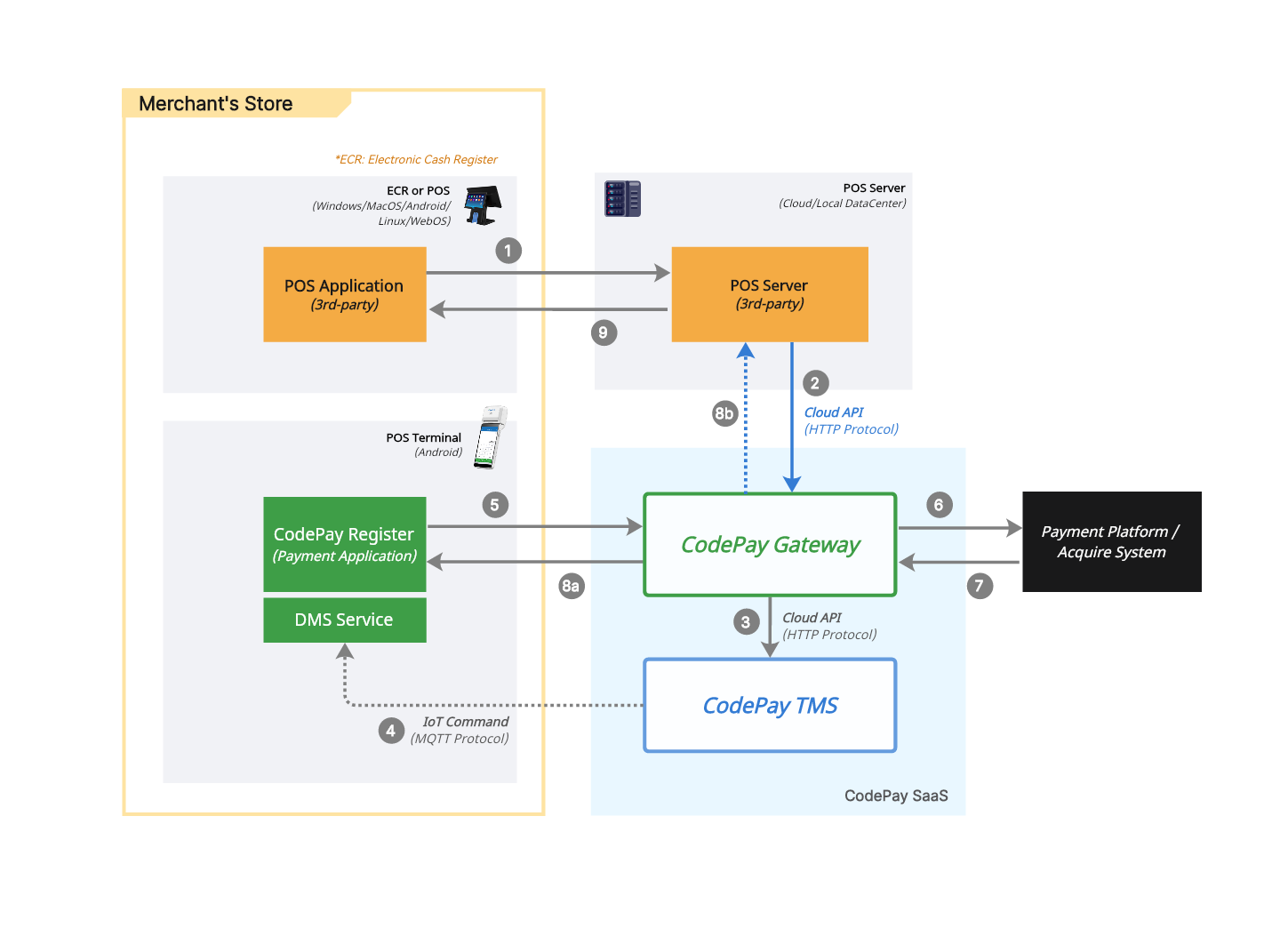
With cloud communication, your POS app and the CodePay terminal talk to each other over the internet:
- Your POS app sends an API request to the CodePay platform.
- The CodePay platform sends the request to the CodePay terminal to start the payment.
- The terminal sends the transaction back to CodePay for processing.
- You will receive the transaction result in:
- Asynchronous: The POS app sends the request and closes the connection.
- The result is received later through an event notification or a transaction status request.
Development guidelines
Before using these APIs, you need to get some required parameters and understand the access rules. Please refer to the API secure .
Enable Terminal ECR mode for cloud communication
Before using the REST API in the CodePay terminal, you need to enable it:
- Log in to the CodePay Register app on the terminal.
- Click the side menu, go to Settings > General > ECR Hub.
- Enable the ECR Hub, and select Cloud.
- Return to standby page.
Check the Cloud communication APIs in the table below.
| Function List | Type | Description |
|---|---|---|
| Create order | API | Submit payment orders through this api. |
| Close order | API | Close unpaid orders through this api. |
| Query order | API | Retrieve a specific transaction, using the merchant_order_no of that payment. |
| Refund a payment | API | Referenced refunds are connected to the original payment, using the merchant_order_no of that payment. |
| Void a payment | API | Cancels the authorisation on a payment that has not yet been captured. |
| Tip Adjustment | API | Add or adjust a tip to an existing payment. For example, the merchant can enter a tip amount written on a receipt. |
| Batch Close | API | Manually closeout the current batch of transactions. |
Verify payment results reliably
Network delays or system issues can sometimes cause a payment to succeed on the terminal while your backend never receives the payment notification. If you only trust the notification, the order can be left looking unpaid — leading to user confusion, support tickets, or a duplicate payment attempt.
Treat the payment notification as your primary signal, but always fall back to querying when it doesn't arrive in time.
1. Handle the payment notification
When your backend receives a payment notification:
- Verify and process it according to the callback parameters.
- Update your order status immediately.
- Return the acknowledgement response CodePay expects, so the notification is not retried unnecessarily.
2. Fall back to polling when no notification arrives
After sending a payment request (or when a notification fails to arrive), poll Query order instead of assuming the transaction failed. Two common strategies:
- Progressive retry schedule — query at increasing intervals (for example
5s → 30s → 1min → 3min → 5min → 10min → 30min), and stop as soon as the result is confirmed. If none of the queries confirm payment by the end of the schedule, close the order with Void a payment instead of leaving it open. - Scheduled task polling — run a periodic job (for example every 30 seconds) that queries any order still unpaid after it was created. If the order is still unpaid after a set number of checks, stop polling and void it.
Interval and retry count can be tuned to your business logic and system capacity.
3. Best practices
- Always prioritize the payment notification over polling results — use polling as the fallback, not the primary path.
- Keep your order-update logic idempotent, keyed on
merchant_order_no, since the same result can arrive more than once (a notification and a query, or a retried notification). - If a user retries payment on an order that's still unpaid, reuse the original
merchant_order_norather than creating a new one. - Log every notification and query for audit and debugging.